


- Your cart is empty Browse Shop
Air Conditioning Symbols Guide: Learn What Each Mode Means

March 06,2026
0
1061
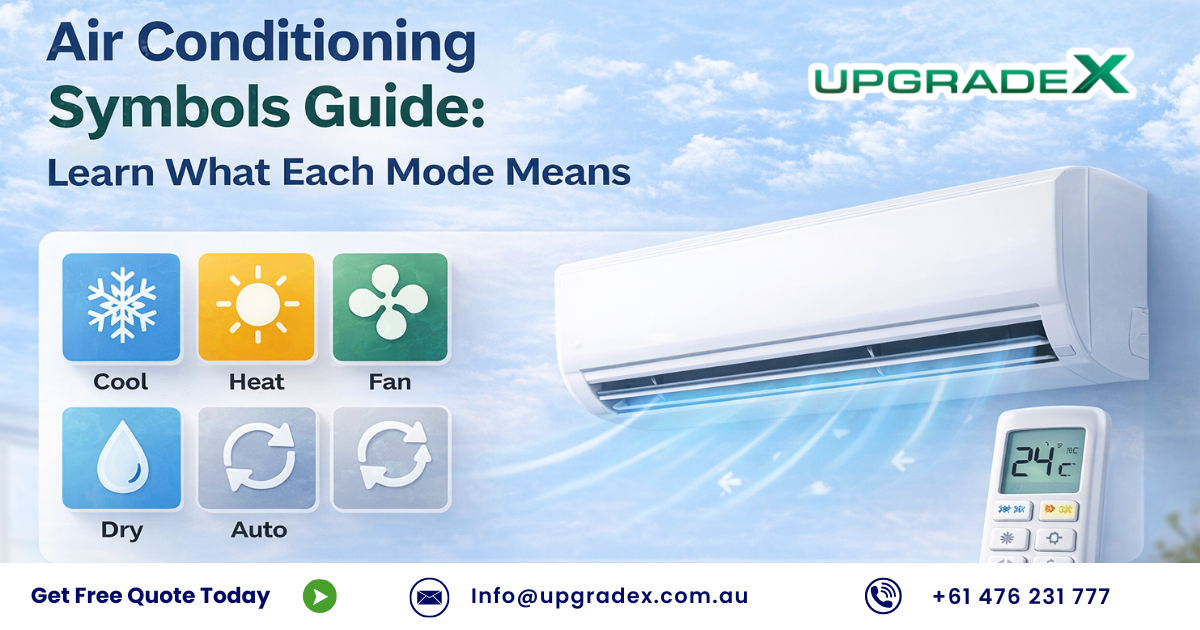
Air Conditioning Symbols Guide: A Complete Guide for Melbourne Homes
Air conditioner symbols are small icons displayed on your AC remote control or indoor unit screen. These icons act as quick visual commands that tell your system exactly what to do — whether it’s cooling, heating, dehumidifying, saving energy, or indicating maintenance alerts.
Understanding these symbols makes it easier to operate your air conditioner efficiently and maintain the best indoor comfort for your home.
Why Understanding AC Symbols Matters
Learning what each symbol means can help you:
• Select the correct mode quickly
• Improve indoor comfort year-round
• Increase energy efficiency
• Lower electricity bills
• Identify maintenance alerts early
In this guide, UpgradeX experts explain the most common air conditioner symbols, advanced mode icons, display indicators, and troubleshooting alerts used in modern AC systems across Melbourne homes.
Air Conditioning Symbols Guide Common Air Conditioner Remote Control Symbols and Their Meanings
Most air conditioner brands use similar universal icons, although the design may vary slightly depending on the manufacturer.
Basic AC Remote Symbols (Quick Guide)
| Symbol | Name | Function |
|---|---|---|
| ⏻ | Power | Turns the air conditioner ON or OFF |
| ❄️ | Cool Mode | Lowers the room temperature |
| ☀️ | Heat Mode | Warms the room (reverse cycle systems) |
| 💧 | Dry Mode | Removes excess humidity from the air |
| 🌀 | Fan Mode | Circulates air without cooling or heating |
| AUTO / A | Auto Mode | Automatically selects cooling or heating |
These icons control the main operating functions of your air conditioning system.
❄️ What Does the Snowflake Symbol Mean?
The snowflake icon (❄️) indicates Cooling Mode.
How Cooling Mode Works
When this mode is activated:
• The compressor and refrigerant system start operating
• Heat is removed from indoor air
• Cool air is circulated through the room
Recommended Settings for Melbourne Summers
For optimal comfort and efficiency:
• Ideal temperature: 22°C – 26°C
• Lower settings increase energy consumption
• Using ceiling fans helps distribute cool air more efficiently
💡 Tip: Setting your air conditioner to extremely low temperatures does not cool the room faster — it simply increases power usage.
☀️ Sun Symbol & 💧 Water Droplet Symbol Explained
☀️ Sun Symbol – Heating Mode
This symbol activates the heating function in reverse-cycle air conditioners.
It works by:
• Extracting heat from outdoor air
• Transferring warm air indoors
Best Temperature Range for Winter
18°C – 21°C provides comfortable and energy-efficient heating for most Melbourne homes.
💧 Water Droplet Symbol – Dry Mode
Dry Mode works as a dehumidifier, reducing moisture levels without strong cooling.
This mode is ideal for:
• Humid weather
• Rainy days
• Mild temperature conditions
It also uses less electricity compared to Cool Mode.
Heat vs Dry Mode Comparison
| Feature | ☀️ Heat Mode | 💧 Dry Mode |
|---|---|---|
| Purpose | Warm the room | Reduce humidity |
| Temperature change | Yes | Minimal |
| Energy consumption | Moderate | Low |
| Best use | Winter | Humid conditions |
Air Conditioning Symbols Guide Advanced Air Conditioner Mode Symbols
Modern air conditioners include smart features designed to maximise comfort and reduce power consumption.
Common Advanced AC Symbols
| Symbol | Mode | Function | Energy Impact |
|---|---|---|---|
| 🌙 | Sleep Mode | Gradually adjusts temperature overnight | Low |
| ⏲️ | Timer | Turns AC on or off automatically | Very low |
| ↕️ | Swing | Moves vents for even airflow | Neutral |
| 🚀 | Turbo Mode | Rapid cooling or heating | High |
| 🍃 | Eco Mode | Reduces electricity consumption | Very low |
🌙 Sleep Mode, ⏲️ Timer & ↕️ Swing Explained
Sleep Mode (🌙)
• Adjusts temperature gradually during the night
• Improves sleep comfort
• Reduces compressor activity and saves energy
Timer Function (⏲️)
• Automatically switches the system on or off
• Ideal for bedtime or when leaving home
Swing Mode (↕️)
• Moves the air vents automatically
• Distributes airflow evenly across the room
Using these modes together can significantly lower your electricity costs.
🚀 Turbo Mode vs 🍃 Eco Mode
| Feature | 🚀 Turbo Mode | 🍃 Eco Mode |
|---|---|---|
| Cooling speed | Very fast | Steady |
| Energy consumption | High | Low |
| Best use | Quick cooling | Daily operation |
💡 Best Practice:
Use Turbo Mode briefly to cool the room quickly, then switch to Eco Mode for energy-efficient operation.
Air Conditioner Display Symbols and Indicators
Indoor AC units often display real-time system information.
Common Display Indicators
| Display | Meaning |
|---|---|
| 🌡️ Numbers | Current or set temperature |
| 🌀 Bars | Fan speed level |
| AUTO | Automatic fan or operating mode |
| ❄️ / ☀️ | Current cooling or heating mode |
These indicators confirm whether your remote settings are correctly applied.
⚠️ Air Conditioning Symbols Guide Air Conditioner Warning & Error Symbols
Some symbols indicate maintenance reminders, while others may signal system faults.
Common Warning Icons
| Symbol | Meaning | Action |
|---|---|---|
| 🧼 Filter icon | Dirty air filter | Clean or replace filter |
| 💧 Water alert | Drain blockage | Inspect drainage pipe |
| ❄️ DEFROST | Normal heating process | No action required |
| E / F Codes | System error | Contact technician |
How AC Symbols Help You Save Energy
Understanding your air conditioner symbols helps optimise system performance.
For example:
• 🍃 Eco Mode reduces daily power consumption
• 🌙 Sleep Mode lowers nighttime energy use
• 🌀 Fan Mode circulates air during mild weather
• AUTO mode adapts automatically to temperature changes
Using these correctly can reduce compressor workload and extend system life.
Symbols That Help Maintain Your Air Conditioner
Responding to maintenance alerts early can:
• Improve airflow
• Prevent mould growth
• Reduce repair costs
• Increase system lifespan
Dirty filters alone can increase energy consumption by up to 20%.
Common Troubleshooting Symbols
| Symbol | Possible Cause | Solution |
|---|---|---|
| 🧼 Filter icon | Dirty filter | Clean immediately |
| 💧 Water symbol | Drain blockage | Check drainage line |
| Flashing light | Sensor issue | Restart system |
| Repeated error code | Hardware problem | Contact technician |
When Should You Call an AC Professional?
You should contact a licensed technician if:
• Error codes continue after a reset
• The system stops cooling or heating
• Electrical faults appear
• Water leakage persists
Early servicing helps prevent major repairs and expensive breakdowns.
Brand-Specific Air Conditioner Symbols (Common in Melbourne)
Different manufacturers may use slightly different icons, but the functions remain similar.
Below are examples of symbols used by major AC brands installed in Melbourne homes.
Daikin Air Conditioner Symbols
| Symbol | Meaning | Notes |
|---|---|---|
| ❄️ | Cooling mode | Efficient at 24–25°C |
| ☀️ | Heating mode | Reverse-cycle heating |
| 💧 | Dry mode | Controls humidity |
| 🌀 | Fan mode | Air circulation |
| A | Auto mode | Smart temperature control |
| 🌙 | Sleep mode | Energy-efficient overnight |
| ↕️ | Swing | Vertical airflow |
| 🧼 | Filter indicator | Clean filter reminder |
Mitsubishi Electric AC Symbols
| Symbol | Meaning | Notes |
|---|---|---|
| ❄️ | Cooling | Inverter cooling |
| ☀️ | Heating | Efficient winter heating |
| 💧 | Dehumidify | Moisture control |
| 🌀 | Fan | Air circulation |
| AUTO | Automatic mode | Sensor-based operation |
| 🌬️ | Eco mode | Energy saving |
| ↔️ | Swing | Horizontal airflow |
Samsung Air Conditioner Symbols
| Symbol | Meaning |
|---|---|
| ❄️ | Cooling mode |
| ☀️ | Heating mode |
| 💧 | Dry mode |
| 🌀 | Fan mode |
| ECO | Energy saver |
| 🚀 | Turbo cooling |
| 🌙 | Sleep mode |
| Wi-Fi | Smart app control |
Panasonic Air Conditioner Symbols
| Symbol | Meaning |
|---|---|
| ❄️ | Cooling |
| ☀️ | Heating |
| 💧 | Dry |
| 🌀 | Fan |
| 🍃 | Eco mode |
| nanoe™ | Air purification |
| ⏲️ | Timer |
LG Air Conditioner Symbols
| Symbol | Meaning |
|---|---|
| ❄️ | Cooling |
| ☀️ | Heating |
| 💧 | Dry |
| 🌀 | Fan |
| 🍃 | Energy control |
| 🌙 | Sleep mode |
| 📱 | Smart ThinQ control |
Rinnai Air Conditioner Symbols
Rinnai air conditioning systems are widely used in Melbourne homes for ducted heating and cooling systems. Their remote controls use standard AC icons along with a few brand-specific functions.
| Symbol | Meaning | Notes for Rinnai Users |
|---|---|---|
| ❄️ | Cool Mode | Used during summer to lower room temperature |
| ☀️ | Heat Mode | Reverse-cycle heating for winter |
| 💧 | Dry Mode | Reduces humidity in the air |
| 🌀 | Fan Mode | Circulates air without cooling or heating |
| AUTO | Auto Mode | System automatically selects cooling or heating |
| 🌙 | Sleep Mode | Gradually adjusts temperature overnight |
| ↕️ | Swing | Adjusts airflow direction automatically |
| ⏲️ | Timer | Schedules the system to turn on or off |
📌 Rinnai Tip:
Using Auto Mode together with the Timer can help maintain a comfortable temperature while improving energy efficiency in Melbourne’s changing weather.
Midea Air Conditioner Symbols
Midea air conditioners are known for energy efficiency and smart inverter technology, and their remotes include several modern comfort modes.
| Symbol | Meaning | Notes for Midea Users |
|---|---|---|
| ❄️ | Cooling Mode | Fast and efficient cooling |
| ☀️ | Heating Mode | Reverse-cycle heating |
| 💧 | Dry Mode | Removes excess humidity |
| 🌀 | Fan Mode | Air circulation only |
| ECO | Eco Mode | Reduces power consumption |
| 🚀 | Turbo Mode | Rapid cooling or heating |
| 🌙 | Sleep Mode | Automatically adjusts temperature overnight |
| Wi-Fi | Smart Control | Control the AC via mobile app |
📌 Midea Tip:
Using Eco Mode can significantly reduce electricity usage while maintaining comfortable indoor temperatures.
⚠️ Common Error & Warning Symbols Across All Brands
| Symbol | Meaning | Action Required |
|---|---|---|
| 🧼 | Dirty filter | Clean air filter immediately |
| 💧 | Drain issue | Check drain pipe or blockage |
| Flashing lights | System error | Restart unit or check manual |
| E / F code | Hardware fault | Contact a technician |
| ❌ | Operation stopped | Safety protection triggered |
Final Thoughts
Air conditioner symbols may seem small, but they play a big role in controlling comfort and efficiency.
When you understand what these icons mean, you can:
• Improve indoor comfort
• Reduce electricity costs
• Extend the lifespan of your air conditioner
If you need help understanding AC symbols, diagnosing system errors, or installing a new air conditioner, the UpgradeX team is here to help homeowners across Melbourne and surrounding suburbs.
Contact UpgradeX Air Conditioning Experts
📞 +61 476 231 777
🌐 https://upgradex.com.au
📧 info@upgradex.com.au